Most agent workflows produce a lot of documents. A few weeks later, nobody knows which of them are still true, and the agent reads all of them anyway.
Matt Pocock's skills take a different approach. They keep a very small set of documents alive in the repository and treat everything else as disposable. This guide explains that setup for a new repo: what each file is for, when it gets written, and why it stays accurate. It also compares the approach with Spec Kit, where the spec itself is the long-lived artifact.
- For: developers starting a repo they plan to build with Claude Code, Codex, Cursor, or another coding agent
- Based on:
mattpocock/skillsplugin version 1.2.3 and Spec Kit 1.1, read on October 3, 2026 - Not covered: exact install commands. They change often, so follow the README for those.
The idea in one picture
There are two kinds of documents:
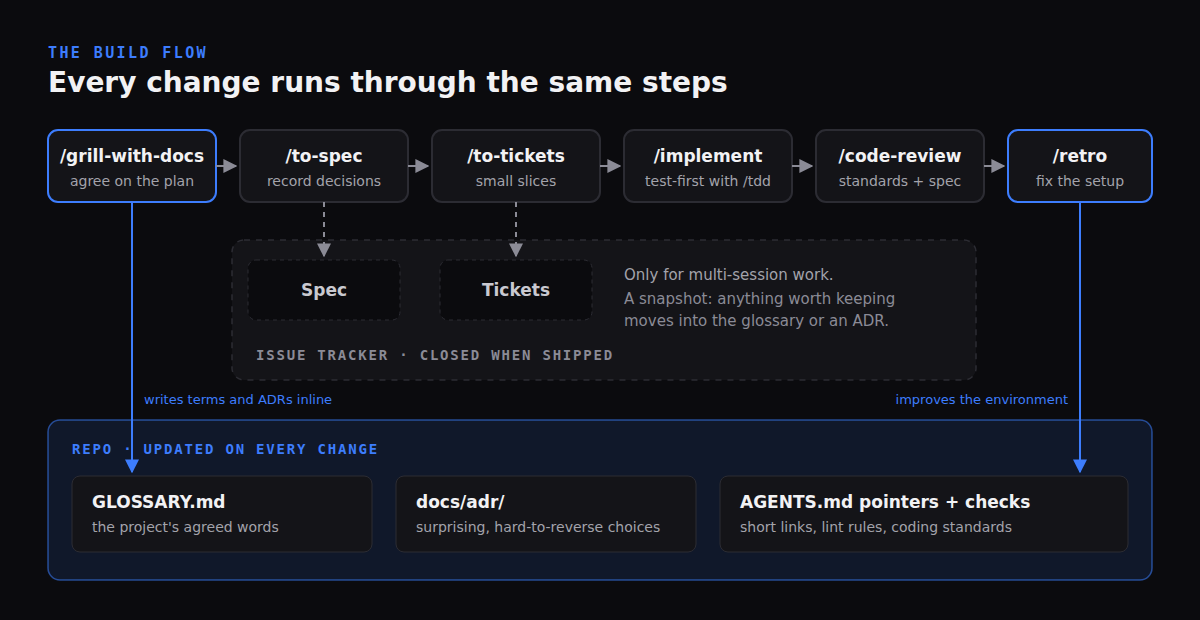
- Living documents stay in the repo and are edited as part of each change:
GLOSSARY.md, the decision records indocs/adr/, and short pointers inAGENTS.mdorCLAUDE.md. - Disposable documents live in the issue tracker and are closed when the work ships: the spec for a feature and the tickets cut from it.
Everything below follows from that split.
Step 1: Install the set once, one way
You can install the skills two ways, and the README asks you to pick one:
- As a Claude Code plugin. A managed, read-only bundle that updates when Matt ships changes. You subscribe instead of forking.
- As editable files through the
skillsinstaller. The skill files are copied into your repo, you own them, and you pull updates when you want them.
Installing both gives you every skill twice. If you already use other process skills (for example a TDD or code review skill from another set), expect them to compete for the same moments. Pick one owner for each step.
Step 2: Run the setup skill once per repo
/setup-matt-pocock-skills is the only required setup step. It looks at the repo first, shows you what it found, and asks three things:
- Where issues live. GitHub, GitLab, or local Markdown files under
.scratch/for solo projects. Specs and tickets will be written there. - Triage labels. Only if you installed the
triageskill. The defaults areneeds-triage,needs-info,ready-for-agent,ready-for-human, andwontfix. - Where domain docs live. Almost every repo gets one
GLOSSARY.mdand onedocs/adr/at the root. A large monorepo can have one glossary per context, listed in aGLOSSARY-MAP.md.
It then writes three small files under docs/agents/ and adds an Agent skills section to your existing AGENTS.md or CLAUDE.md. That section is only pointers: one line per topic and a link to the file with the details.
Why pointers: whatever is in AGENTS.md is loaded into every agent session. Matt's retro skill says to use it "incredibly sparingly, usually only for navigation pointers to other files." Short pointers cost little and do not go stale, because the details they point to are maintained in one place.
Notice what setup does not do. It does not create an empty glossary or ADR folder. The domain.md it writes tells agents to skip missing docs silently and not suggest creating them. Docs appear only when there is something true to write.
Step 3: Build shared language with a glossary
The most important context file is GLOSSARY.md. It is the project's own vocabulary, agreed once, so you and the agent stop spending words rediscovering what things are called.
Matt's example from one of his projects:
- Before: "There's a problem when a lesson inside a section of a course is made 'real' (i.e. given a spot in the file system)"
- After: "There's a problem with the materialization cascade"
A glossary entry is a term, a one or two sentence definition, and the words to avoid:
**Invoice**:
A request for payment sent to a customer after delivery.
_Avoid_: Bill, payment request
The rules that keep it useful:
- Be opinionated. If three words mean the same thing, pick one and list the others under Avoid.
- Define what a thing is, not how it is built. No implementation details, no spec notes, no scratch pad. Code changes often. The meaning of "Invoice" rarely does.
- Only project-specific terms. "Timeout" does not belong. "Materialization cascade" does.
How it gets written: you don't sit down and write a glossary. You run /grill-with-docs at the start of a change. The agent interviews you about the plan, challenges fuzzy words ("do you mean the Customer or the User?"), checks your answers against the code, and adds each term to GLOSSARY.md as soon as it is resolved.
Why it pays off: variables, files, and tickets get named consistently. The codebase becomes easier for an agent to search. Conversations get shorter. Matt's docs also report that not everyone agrees the glossary makes the model itself perform better. Even then, it removes ambiguity between the people working on the project, which is worth having.
Existing repo with no docs? Point /grill-with-docs at the repo itself and ask it to help document it. It reads the code and asks which of the words already in use are the right ones.
Step 4: Record only the decisions that would surprise someone
The second living document is a folder of short Architecture Decision Records (ADRs): docs/adr/0001-slug.md, 0002-slug.md, and so on. An ADR can be one paragraph: the context, what was decided, and why.
The agent offers to write one only when all three of these are true:
- Hard to reverse. Changing your mind later would be expensive.
- Surprising without context. A future reader would ask "why on earth did they do it this way?"
- A real trade-off. There were genuine alternatives and you picked one for specific reasons.
Good candidates: the database or auth provider, "we write SQL by hand instead of using an ORM because…", "customer data is owned by one module and referenced by ID elsewhere", or a constraint that cannot be seen in the code, such as a compliance rule.
Why so strict: a decision log only works if it is short enough to read. Most sessions produce no ADR, and that is by design. When a later change contradicts an ADR, the agent is told to say so openly instead of quietly overriding it. That is how the record stays honest.
Step 5: Let specs and tickets be thrown away
For work that spans more than one agent session, the flow continues:
/to-specturns the conversation you just had into a spec and posts it to the issue tracker. It writes down decisions that were already made. It doesn't make new ones, and it leaves out file paths and code snippets because those go stale fast./to-ticketscuts the spec into small tickets, each sized for one fresh session, with its blocking tickets listed./implementbuilds a ticket test-first through/tdd, then runs/code-reviewagainst both the repo's standards and the original spec.
Small changes that fit in one session skip the spec: go straight from grilling to /implement.
Matt's docs are direct about what happens to the spec afterwards: nothing keeps it in sync, so it becomes a snapshot that "goes stale the first time implementation teaches you something." The advice is to treat it as throwaway once the work ships. If something learned during implementation is worth keeping, it belongs in the glossary or an ADR, not in an edited spec.
Step 6: Keep the living docs alive
Living docs stay accurate because updating them is part of the work, not a separate chore:
- Every change starts with
/grill-with-docs, which reads the glossary and ADRs and updates them inline as the conversation settles things. - Every skill reads them before exploring code, uses glossary terms in issue titles and test names, and flags conflicts with existing ADRs.
/retroafter a session suggests improvements to the agent's environment: a missing pointer, a lint rule that would have caught a mistake, a coding standard the reviewer should enforce. Mechanical mistakes become automated checks rather than more text inAGENTS.md./improve-codebase-architectureevery few days looks for places where the code could be simpler. Picking one starts a new grilling session, which sharpens the glossary again.
The set of documents that must stay true is small, and each one changes in the same session as the decision that affects it.
How this differs from Spec Kit
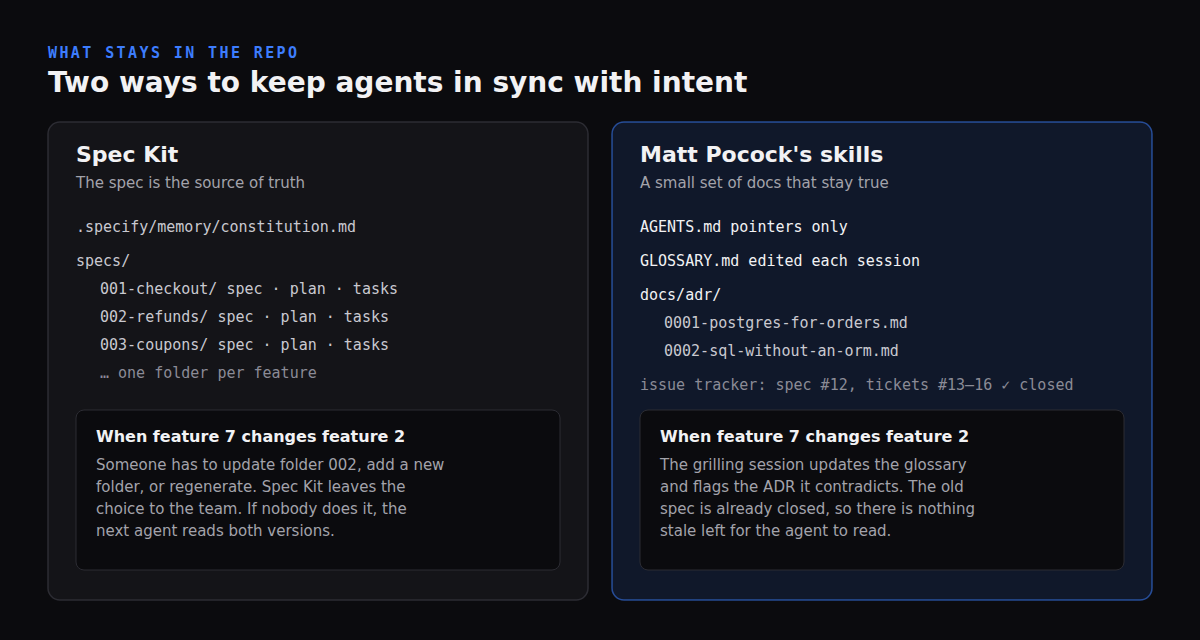
Spec Kit takes the opposite view of the spec. Its own write-up says specifications become "the central source of truth", with plans and code regenerated from them. In practice, each feature gets a folder such as specs/001-checkout/ with spec.md, plan.md, and tasks.md, plus a project-wide constitution in .specify/memory/constitution.md.
That keeps a full record, but someone has to decide what happens to old folders when requirements change. Spec Kit leaves that choice to the team and names three models, each with a risk it documents itself:
| Spec Kit model | What you do on a change | Risk Spec Kit lists |
|---|---|---|
| Flow-back | Edit any artifact, then reconcile | Silent drift between artifacts |
| Flow-forward | Add a new feature folder | Duplicate or fragmented context |
| Living spec | Edit spec.md, regenerate the rest |
Lost rationale |
The common failure is the first one. Feature 7 changes behavior described in feature 2's spec, nobody goes back to edit folder 002, and the next agent reads both.
Matt's approach avoids the problem by keeping fewer documents:
| Spec Kit | Matt Pocock's skills | |
|---|---|---|
| Long-lived source of truth | The spec (plus constitution) | Glossary, ADRs, and the code and tests |
| Where specs live | In the repo, one folder per feature | In the issue tracker, closed after shipping |
| What an agent reads at the start | Constitution, the feature's spec, plan, and tasks | AGENTS.md pointers, glossary, relevant ADRs |
| How docs stay current | A team convention you choose | Updated inline during each grilling session |
| Best fit | Teams that need an audit trail of requirements per feature | Teams that want a small context that is always true |
Neither is wrong. If you need traceable requirements per feature, Spec Kit's folders are useful. If your main problem is agents reading outdated plans, keep the plans out of the repo and protect the few documents that matter.
Tradeoffs and failure modes
- Decisions can fall through the gap. A decision that is not a term and does not pass the three ADR gates exists only in the conversation. Matt's docs name this as the biggest open complaint. Keep the same session going into
/to-specand read the spec against your own answers. - Silent no-op.
/grill-with-docsdepends on two other skills (grillinganddomain-modeling). If one fails to load, you get a good interview and no files. Check thatGLOSSARY.mdactually changed during the session. - Inside other frameworks. When run as a step inside another orchestration layer, the file-writing part is reported to sometimes not happen. Check the working directory before trusting the output.
- Several writers. Glossaries and ADRs are real files, so two people can drift them. Review them in pull requests like code.
- It is not your feedback loop. Docs explain intent. Tests, types, and CI prove behavior. Pair this with an agent-ready repo that has one verify command.
How to tell it is working
AGENTS.mdstays short and mostly links to other files.GLOSSARY.mdchanges during sessions, term by term, and contains no implementation detail.docs/adr/grows slowly, and each record explains a choice someone would otherwise question.- Agents use your project's nouns in issues, tests, and PR titles without being reminded.
- Closed specs are never quoted as current behavior.
Next steps
- Read the skills repository and the
ask-mattskill, which maps every flow. - Make the repo's checks agent-friendly with the agent-ready Next.js repository guide.
- New to skills? Start with Agent Skills: The Open Standard for Custom AI Capabilities.